Navigation · Redirect macro
Retire a page without breaking a single link to it
With the Redirect macro you move documentation without breaking the URL that is already in someone's bookmarks, a Jira ticket and last year's onboarding email. Readers are sent on to wherever the content lives now - no deleted page, no stale copy misleading them.
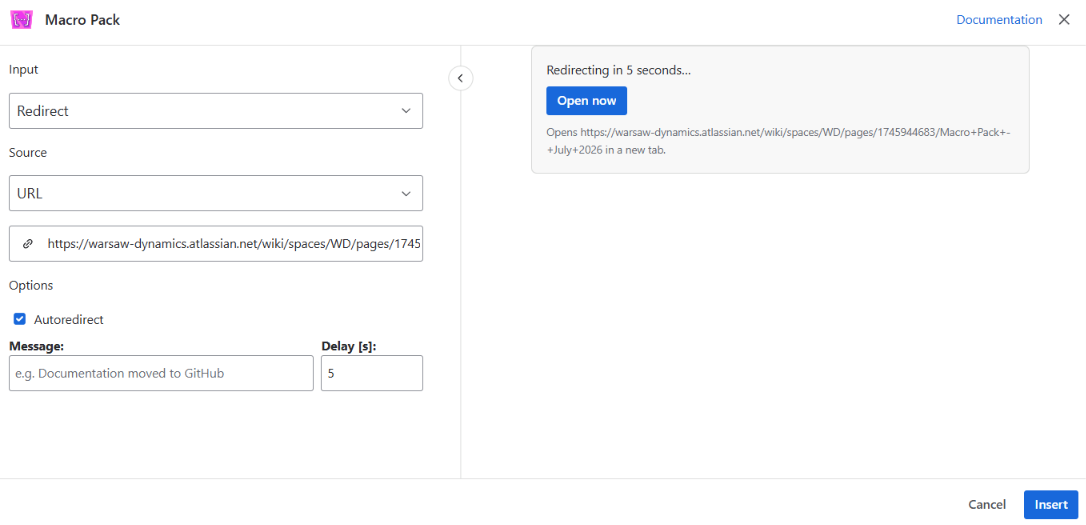
You reorganise without a trail of dead ends
Delete the old page and you break every link to it; keep it and readers act on outdated instructions. A redirect keeps the address working and takes people to the current version - your reorganisation happens without either of the two bad options.
Your readers understand what happened and update their bookmarks
A silent jump is disorienting. Add a message - "This guide moved to the Platform space" - and a reader understands why they were moved, learns the new location, and updates their own bookmark instead of arriving here again next month.
Nobody feels hijacked by a link
Turn on autoredirect and the reader sees a countdown - from three seconds up to ten minutes, your choice - long enough to read the message, with an Open now button for anyone who does not want to wait. Or leave it manual, so nothing happens until the reader chooses to continue.
You point a shortcut at anything, and readers keep the page behind them
The destination is any URL, so this works for more than tidying up Confluence: point an internal shortcut page at a support portal, a status dashboard or an external standard. Readers land in a new tab, so the page they came from is still there behind them.
What the admin tools leave you waiting for
The alternative is an administrator's tool: redirects managed centrally, in bulk, by whoever has the keys. That is right for an instance-wide migration and far too slow for your everyday case - a page you are retiring this afternoon, in a space you own. Here the redirect is a macro you add while you are already editing, and the reader sees what is happening: a message, a countdown and a button, with the destination opening in a new tab so the old page is still there if they need it.
Redirect is one of 31 macros in Macro Pack
One app to install, one licence to renew, one place your team learns - and 30 more formats it already reads, from spreadsheets and diagrams to API specs and documents.
See every macro in the pack